
How to analyze the comments on a TikTok video when it isn’t taking off
For you if you have posted a few TikToks that haven’t taken off and want to understand what your audience really expects.
By Creatype · Updated November 7, 2026 · 10 min
In short
You have posted a few videos, they aren’t taking off, and you don’t know what is going wrong. To find out by analyzing the comments on a TikTok video, copy a sample of comments into a spreadsheet, put each one in a category (question, objection, request, personal story, praise, mockery, off topic), then count what comes up most. What comes up tells you what your audience expects, what holds them back and what they want to see in your next video.
How do you analyze the comments on a TikTok video?
Nothing complicated or technical: a spreadsheet or a notebook is enough, and what you write down stays with you. This guide gives you the full method to follow by hand, then explains how to have it done automatically.
The plan: why read comments, how to collect them (even when there are few), how to sort them, the reading grid, a worked example from the personal-development world, mistakes to avoid, what to do with the result, then automation with Créatype.
Why read comments instead of just looking at the numbers?
When a video isn’t taking off, the statistics only say “few”: few views, few likes, few shares. They do not say why. A comment is written in the person’s own words: they ask their question, admit a doubt, describe their situation or ask for the next video.
It is a bit like a moodboard made of words: it shows what your audience likes and what it is looking for. It is the only free-text feedback you get from your audience without asking for it. It is public, free and already there. Read well, it helps with three things: choosing your next topics, fixing what was not understood, and seeing who is really talking to you.
How do you collect the comments of a TikTok video?
Open the video, tap the comments icon, then scroll. On a computer, the same video opened on tiktok.com also shows its comments, which makes copying easier. If the video is yours, TikTok Studio, available at www.tiktok.com/tiktokstudio, has a Manage section that TikTok’s help page says lets you search, filter and sort your posts and comments, and reply to comments, like them or delete them.
Set up a table with five columns: the comment text, the account name, the category, the topic and a free note. An ordinary spreadsheet is enough. Example of a filled row: “Which notebook do you use?” / @account1 / Question / Equipment / “wants the same notebook”.
Few comments under your videos? A video that few people see gets few, and the method still works. Collect the comments from your last three or four videos, then add those from public videos by accounts that talk about the same subject as you, in a mood close to yours. You then learn what a neighboring audience expects, not your own: keep that difference in mind when you draw conclusions.
- Aim for 30 to 100 comments. Below that you are looking at isolated cases. Above that, sorting by hand takes long without changing the result much.
- Take the comments at the top, then a batch further down. The first ones are the most visible; a batch lower down keeps you from reading only the reactions that are pushed forward.
- Copy the text as it is, typos included. Summarizing before sorting loses the exact words, which you will reuse in your titles and hooks.
- Write the date and the video link at the top of the table. In a month you will want to compare.
- Add other viewers’ replies when they help: an “same here” under a question counts as a second person asking it.
- None of this is published. Your table, your notes and your conclusions are seen by no one, and you can practice on other accounts’ videos before looking at your own.
How do you sort comments step by step?
Sorting takes three passes. Each pass has a single goal, so you do not try to do everything at once and make mistakes.
- Pass 1, reading: read all the comments without noting anything. You are looking for the general impression. Are people asking questions, doubting, telling their story?
- Pass 2, category: give each row a category from the grid in the next section. One category per comment. When in doubt, pick the one that describes what the person wants.
- Pass 3, topic: write in two or three words what the comment is about (“notebook”, “evening routine”, “no time”, “video length”). Do not create a new topic for a single comment; write “other”.
- Counting: sort the table by category, then by topic. The groups with the most rows are your priorities.
- Review: reread the five comments furthest from the rest. Rare cases sometimes show a request nobody else dares to make.
Rather not do it by hand? Paste a TikTok link and get the audience profiles.
Analyse for freeWhich reading grid should you use to categorize comments?
Here is a grid of eight categories. Copy it as it is into your table. The examples are invented for illustration.
- Question: the person wants information. Example: “Which notebook do you use for your routine?”
- Objection: the person doubts or refuses. Example: “Journaling never lasts more than a week for me.”
- Request for more: the person wants another video. Example: “Do the same thing for the evening!”
- Personal story: the person describes their case. Example: “I started a morning routine last month and stopped after three days.”
- Praise: the person likes it without asking for anything. Example: “Your voice is so calming.” Useful to know what works, not to pick a topic.
- Mockery or disagreement: the person criticizes the substance or the form. Read these carefully: they often point to something that was explained badly.
- Tag or share: the person points another account to the video (“@name look at this”). It shows who shares and with whom.
- Off topic or promotion: set aside and do not count.
Example: analyzing 40 comments on a “morning routine” video
An invented example to show the result. Someone posts a “my 5-minute morning routine” video. They copy 40 comments and sort them.
Count: 14 questions, 9 requests for more, 6 objections, 5 personal stories, 4 praise, 2 off topic. Among the questions, the topics that come back are “the notebook” (6 times) and “the evening version” (4 times). Among the objections, three people say they can’t keep a routine going for more than a few days. Among the stories, two people say they get up very early for their studies or their job.
Reading this result: the audience is not looking for one more routine, it is looking for a routine it can keep when mornings are packed, and it notices the objects in the video’s world, here the notebook. The next videos can start from three phrases: “my notebook”, “the evening version” and “when you can’t keep it up”. The exact words in the comments give the hooks: “Which notebook?” becomes “The notebook you asked me about”.
The matching decision sentence: “Because 6 people ask me about my notebook, I film a 30-second video on Saturday, in the same mood as usual, and I open with: ‘You asked me about my notebook.’” Then note, in the table row, which video answers each group, so you can check later whether the topic worked.
What mistakes should you avoid when analyzing comments?
- Reading only the most visible comments. The ones at the top of the list do not represent everyone.
- Mixing several videos in one table. People who react to one topic are not the ones who react to another. One video, one table.
- Believing commenters are all the viewers. Only a small part of those who watch write anything. Comments describe the people who react, not the whole audience.
- Taking mockery as a verdict on you. A harsh comment most often points to something that was explained badly in the video, rarely to a judgment of the person who posted it. Sort it, count it, and move on to the next one.
- Keeping only the praise. It feels good and teaches almost nothing.
- Answering every question before the sorting is done. You lose perspective and stop counting.
- Trying to identify people. The goal is to understand groups, not to follow individuals. Stay with what each person wrote publicly.
- Concluding too fast from one video. A video that spreads widely attracts passing comments; a quieter one more often attracts people already interested. Compare before you generalize.
What should you do with the result of the analysis?
Turn each large group into a written action. An analysis table that does not end in a sentence like “I film this video” is wasted.
- A group of questions becomes an answer video. Reuse the question word for word in the title or the first sentence.
- A group of objections becomes a “what if it doesn’t work for you?” video. Name the objection in the first seconds.
- A request for more becomes the next video. Reply in the comments that the follow-up is coming: people come back to see it.
- A group of personal stories shows who watches you: situation, daily rhythm, level. Write that person’s portrait in one sentence and address your next scripts to them.
- Repeat the same analysis on three videos. A topic that returns from one video to the next is solid; a topic that appears once is not.
- What the method changes, and what it does not. It changes the topic and the first sentence of your videos, not what you show of yourself: you always decide what gets published.
- Checklist before concluding: at least 30 comments read; one category per row; off-topic rows excluded from the count; a group that appears at least five times; one written action per group; a date for the next analysis in your calendar.
- Decision sentence to copy: “Because [number] people ask about [topic], I film [format] on [day], and I open with: [quote from the comment].”
How do you automate comment analysis with Créatype?
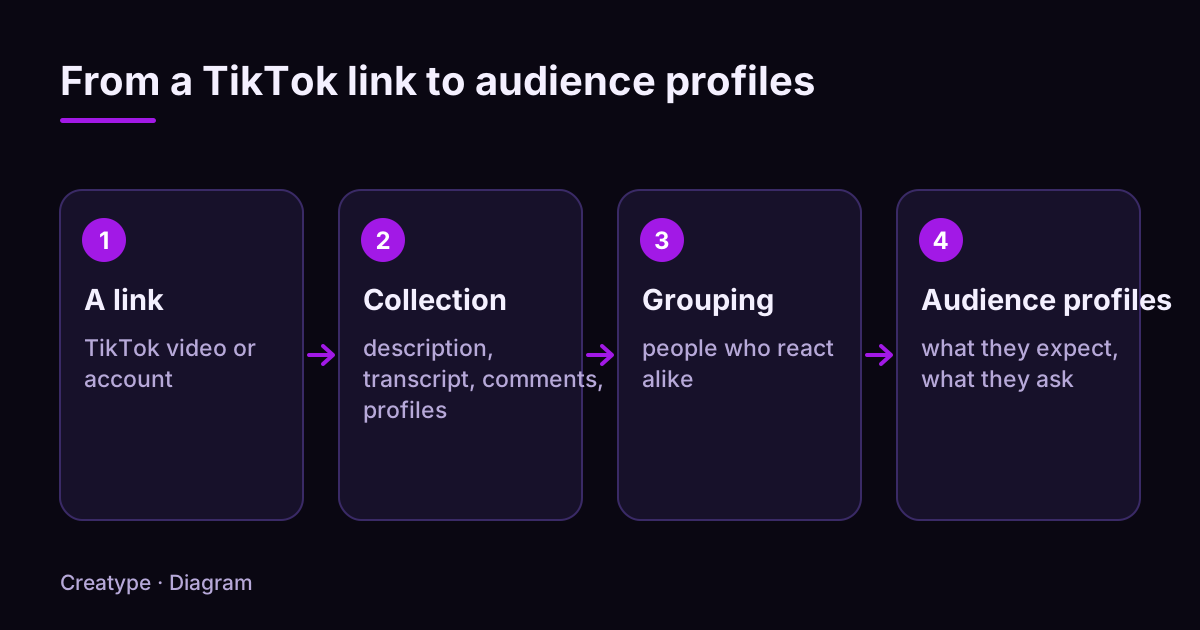
The method above works, but it takes time and every new video means starting again. Créatype does that work for you. You create a free account, with Google or with a link sent by email, no credit card, then you paste the link of a TikTok video or account: yours, or one from an account in your world.
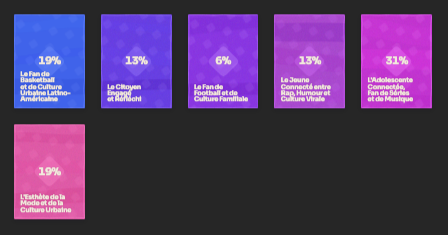
Créatype reads the video’s context, its public comments and the profiles of the people who react. It groups them and returns audience profiles, called Créatypes: what they expect, what they ask. A quote is shown before launch. You can cancel.
You choose the number of profiles, the depth (Light, Standard or Deep) and the model. The Free plan includes the Haiku model and up to 5 audience profiles and 100 accounts examined, and does not include the Deep depth. The Go plan, at €13 per month (€120 per year), opens all models, the Deep depth, PDF and CSV export, and Planifier to follow one account. The Pro plan, at €105 per month, follows five accounts with Planifier.
An audience profile does not stand for one specific person or for all your viewers: it describes a group of public accounts that react in the same way. You can then write ideas and scripts with the Prisme assistant.
You do not have to understand everything before you start. Run a first analysis on the Free plan on one video, look at the profiles you get, then use this guide’s grid to check that what you read matches the original comments.
See it on a real video: create a free account and analyse a TikTok link.
Analyse for freeWhat does an audience profile look like?
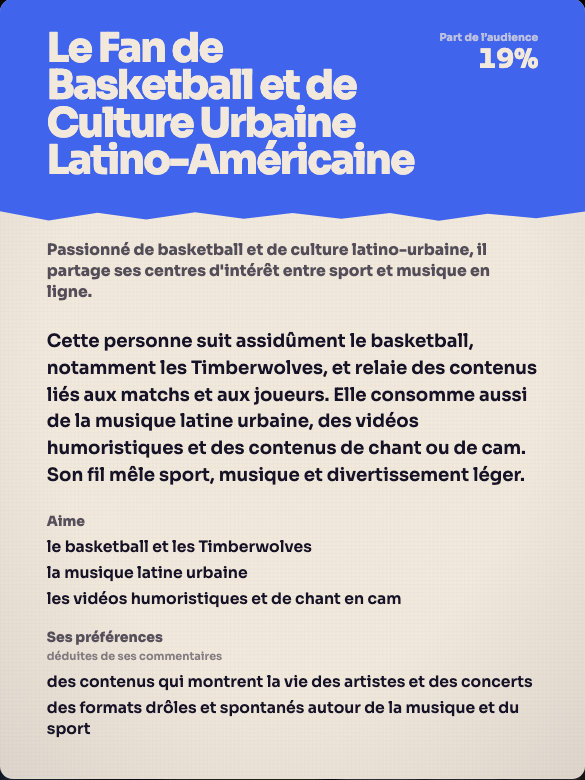
Here is a real card, opened from the result shown above. It gives the profile’s name, its share of the audience, what these people like and what they seem to prefer based on their comments. It is the readable version of the table you filled in by hand: groups, with their tastes.
Read a card as a hypothesis to check: open a few original comments to confirm it matches what you read.
Sources and further reading
The TikTok help pages below were opened and read on November 6, 2026. Features can change and vary by country and account.
Try it on your own video
The free plan needs no card: create your account, paste a TikTok link, get the audience profiles. Go (€13/month) adds every model, Deep analysis, PDF and CSV export and Schedule.
Was this article helpful?