
TikTok Audience Analysis: The 4 Methods, and the One That Holds Up at Scale
For you if two or three of your videos have taken off and you want to understand why, then repeat it on other accounts.
By Creatype · Updated November 7, 2026 · 10 min
In short
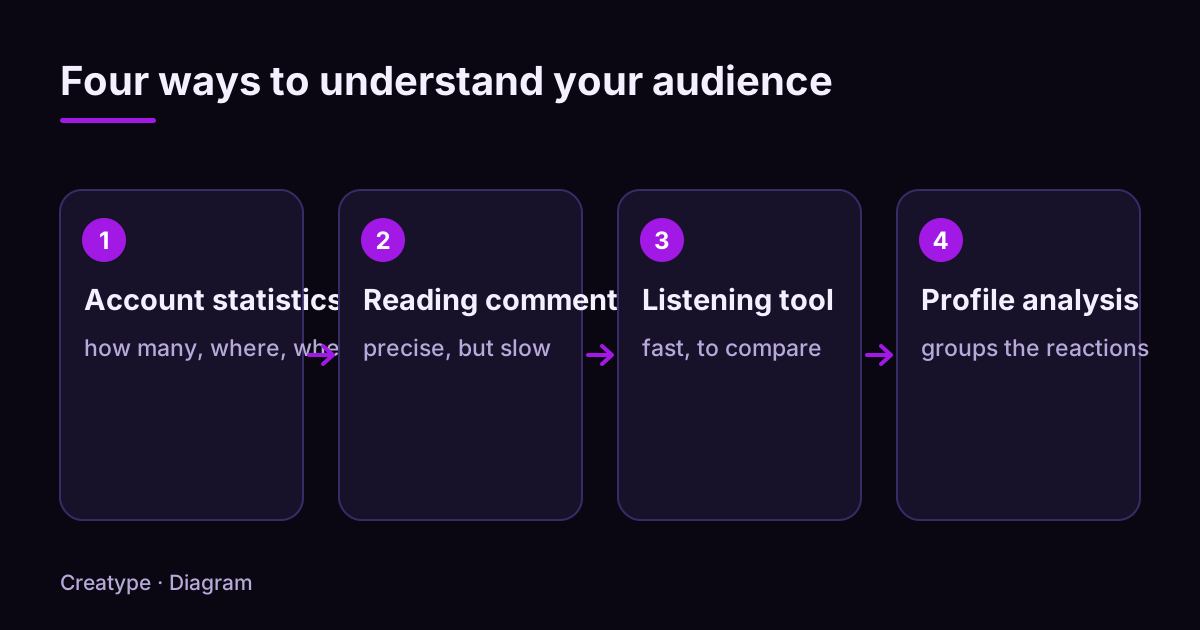
When two or three of your videos have pulled ahead of the rest, the question is no longer “does this work?” but “what worked, and where can I do it again?”. Four methods can answer it: the account’s built-in statistics, reading comments by hand, social listening tools, and audience profile analysis. Statistics tell you how many people watch and when. Comments and profiles tell you who they are and what they expect. No single method answers everything, and none guarantees a number of views.
How do you do a TikTok audience analysis when a few videos have already taken off?
This article says what each method gives you, what it cannot show, how much time it takes, and which one holds up when you study other creators or follow several accounts. You can use the first three without any paid tool. The plan: the four methods, the detail of each, a comparison built for scaling up, a decision guide, then what Creatype does with profile analysis, Planifier, export and MCP.
What are the four methods, and which one holds up at scale?
You can describe an audience in two ways. The first is quantitative: how many views and followers, at what hours. The second is qualitative: who these people are, what they say, what makes them react. Scaling up means repeating the qualitative part across several videos, several creators, sometimes several accounts. That is where the four methods part ways.
- Built-in statistics: the numbers TikTok gives you about your own account. Free and reliable, but limited to what the platform chooses to show.
- Reading comments by hand: you read, sort and count. Very precise, but the time grows with every video and account you add.
- Social listening tool: software that watches public mentions and summarizes their volume and tone. Fast across a whole market, but compare carefully.
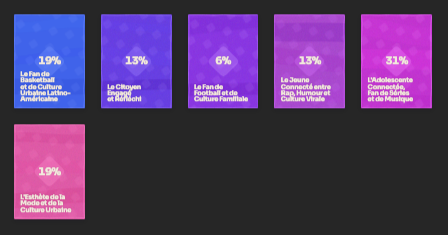
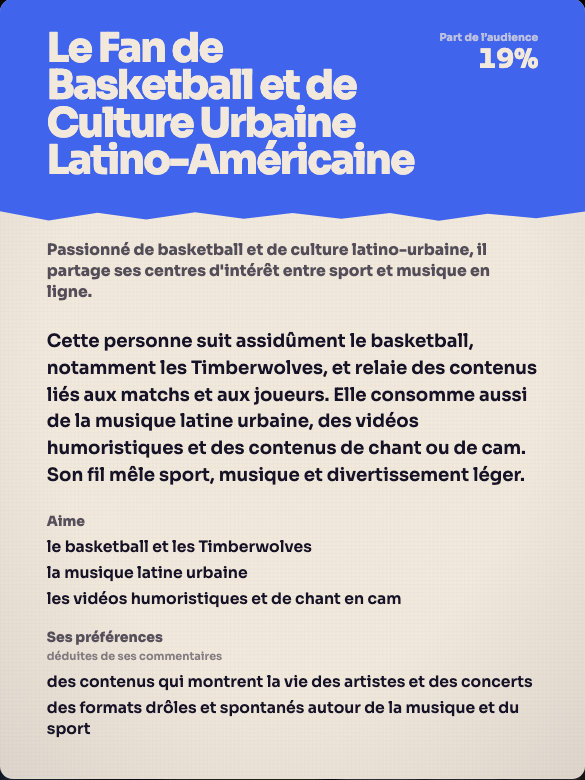
- Audience profile analysis: you group the people who react into broad types (audience profiles) to see who is talking and why. It is the only one of the four you can repeat on another creator’s account without spending hours.
What do built-in statistics show about your videos that took off?
According to TikTok’s help page on TikTok Studio, the Analytics section has account analytics and video analytics. For the account, four views are described: Overview (a summary), Content (metrics for all your posts and trending content), Viewers (key metrics, demographics and activity times of your viewers) and Followers (a demographic view and other insights on your followers).
For a single video, the page describes three views: Overview, Viewers and Engagement. The Engagement tab holds comment insights and inspiration for future posts. TikTok also says that, depending on your location, you can see aggregated performance insights on other creators’ posts from the Inspiration feed, using the Insights button.
These statistics answer questions of volume and timing well: which video was watched most, when your viewers are active, which demographic group leads. They answer the others poorly: why a video took off, what people want next, which objection holds them back. For that, you need to read what people write.
- Good for: isolating your videos that took off, comparing them with those that did nothing (Content tab), choosing posting times, checking that you reach the audience you aim for.
- Limit: these are totals. They do not tell you what people think.
- Limit: they mostly cover your own account. To study another creator, you need another method, apart from the Inspiration insights, depending on your location.
- Cost: free, a few minutes a week.
How do you analyze comments by hand, and how far does it go?
Comments are the only written trace of what your audience thinks. TikTok Studio lets you browse them: the help page says the Manage section shows your posts with their metrics, and its Comments tab lets you delete, like, dislike and reply.
TikTok also offers comment insights, which use AI to summarize and sort comments: most discussed topics, content suggestions, positive comments or questions. According to the help page, this feature is not available everywhere, it requires you to be at least 18, and its settings are on by default. Check whether it appears in your account before relying on it.
A useful manual reading needs a method. This is the one we recommend:
- Pick your 2 or 3 videos that took off, plus 1 or 2 that got few reactions.
- Copy 30 to 50 comments per video into a table (one text column, one category column).
- Put each comment in a single category: question, objection, personal story, content request, compliment, mockery, off topic.
- Count each category. A category that shows up across several videos is a signal. One that appears once is an anecdote.
- Write down three exact phrases people use. These are the words to reuse in your hooks.
- End with a written decision: “The next video will answer…”.
Rather not do it by hand? Paste a TikTok link and get the audience profiles.
Analyse for freeWhat is a social listening tool good for when you study a market?
A social listening tool watches public mentions (a keyword, a brand name, a hashtag) and turns them into totals: number of mentions, change over time, positive or negative tone. Some cover several networks at once. Depending on the tool, TikTok coverage, how far back the history goes and how tone is scored vary a lot.
This method fits broad questions: “Is a topic rising in my niche?”, “What do people say about a tool or a brand?”. It fits less well for precise ones: “Who watches this creator’s videos and why?”. Tone totals are also sensitive to sarcasm and slang, which software sometimes scores backwards.
We do not compare specific tools here: their features and prices change, and only their official page is authoritative. If you try one, ask it four questions before you pay.
- Does it cover TikTok, and on what data (posts, comments, both)?
- How far back does the history go?
- Can I read the raw comments behind a total, to check the tone?
- Does the price stay the same if I track several keywords, so several niches?
How does audience profile analysis work?
Profile analysis starts from one observation: a video does not speak to “everyone”. It gathers a few types of people, who do not react the same way. The idea is to group the people who comment into broad types, each with its own expectations, vocabulary and objections.
By hand, this means reading not only the comments but also the public profiles of the people writing them: what they post, how they describe themselves. It is slow, which is where a tool helps. However you do it, an audience profile is a summary: it represents neither a single person nor all of your viewers, only those who reacted publicly.
Invented example: under a video that shows an agent sorting a mailbox, you might find three types of people. “Curious viewers” ask which tool is used. “Tinkerers” describe their own setup. “Skeptics” ask whether it holds up day to day. What to make next differs for each: a tool comparison, a step-by-step demonstration, a week-long test.
The gain at scale comes from comparison. Do the same reading on a video from a creator in your niche, then put the two results side by side. Types of people who show up on both sides are a signal. Those who appear only on their side are a lead to test, not proof.
- Good for: knowing who you actually talk to, comparing your audience with another creator’s, finding video ideas, preparing a hook for a specific type of viewer.
- Limit: only people who react publicly are visible. Those who watch silently do not appear.
- Limit: a summary is not proof. Always reread a few raw comments to confirm.
How do the four methods compare when you want to scale up?
The list below compares the methods on five points, with a view on what happens when you multiply videos, creators or accounts. Durations are rough orders of magnitude for a single account; adapt them to your situation.
- Built-in statistics: answers how many, when, where. Effort: a few minutes. Cost: free. Limit: no “why”. At scale: does not help you study another creator, apart from the Inspiration insights depending on your location.
- Reading comments by hand: answers what people say and which objections. Effort: one to two hours for a few videos. Cost: free. Limit: slow, quickly subjective if you do not categorize. At scale: the time multiplies with every video and account.
- Social listening tool: answers what is said about a topic or brand. Effort: initial setup, then reading reports. Cost: varies by tool. Limit: totals, tone sometimes wrong, coverage to verify. At scale: good for spotting a topic in a market, not for describing one creator’s audience.
- Audience profile analysis: answers who reacts, with what expectations. Effort: minutes with a tool, several hours by hand. Cost: free by hand, varies with a tool. Limit: only sees people who react. At scale: repeats on every video or account you study, and can be scheduled with Creatype.
How do you choose the right method?
Start from your question, then take the cheapest method that can answer it. If it is not enough, add a second one. The methods complement each other: numbers show where to look, comments and profiles explain.
- “Which videos took off, and when should I post?”: built-in statistics.
- “Why did my videos that took off work?”: read the comments, then profiles.
- “Who reacted, and what video should come next?”: audience profile analysis.
- “What do creators in my niche do that I do not?”: profiles on their public videos, or reading their public comments by hand. Built-in statistics only cover your own account, apart from the Inspiration insights described above, depending on your location.
- “What topic is rising in my sector right now?”: social listening tool.
- “I have several accounts or several niches”: one profile analysis per account, rerun by Planifier, rather than one manual reading per account.
- Little time: use a tool. Plenty of time and no budget: manual reading with the grid from section 4.
What does Creatype do for profile analysis, Planifier and MCP?
Creatype automates the fourth method. You create a free account with Google or with a link sent by email, no credit card needed. You paste the link of a TikTok video or account, yours or one from a creator you study. Creatype reads the video’s context, the public comments and the profiles of the people who react, then returns audience profiles.
Before launch, you set the number of profiles, the depth (Light, Standard or Deep) and the model. A quote is shown before it starts, and you can cancel an analysis in progress. The Free plan includes the Haiku model, up to 5 audience profiles and 100 accounts examined, without Deep depth. The Go plan, at €13 per month (€120 per year), gives access to all models, Deep depth, PDF and CSV export, and Planifier to follow 1 account. The Pro plan, at €105 per month, lets you follow 5 accounts with Planifier.
To repeat the analysis without launching it by hand, Planifier reruns an analysis, an ideas request or a question at the time you choose. When you arrive, the result is already there. Planifier also checks whether new videos have been posted before starting the work: a check that finds nothing new does not trigger an analysis. Each run uses your usage allowance like a request made by hand.
If you work with an agent, MCP (for paid plans) lets an external assistant such as Claude, ChatGPT, Cursor or Codex create ideas and scripts, edit saved ideas, read your account status and stop a generation. You copy no token: your client opens a Creatype consent page, and you can revoke access at any time in the settings. Actions use your subscription and your usage window, as in the app. The Prisme conversation is not exposed through MCP. You can also export an analysis as PDF or CSV (Go and Pro) to open it in a spreadsheet or hand it to your agent.
Creatype does not replace TikTok’s statistics or reading a few raw comments. It saves time on the longest part: grouping the people who react. It promises neither views nor income. Instagram and YouTube are listed as “coming soon”, with no date.
See it on a real video: create a free account and analyse a TikTok link.
Analyse for freeSources and further reading
The TikTok features mentioned in this article come from the official help pages below, read on November 6, 2026. They change over time: check what you see in your own account. Creatype’s own features (Planifier, MCP, export) are detailed in the in-house guides.
- TikTok Support: TikTok Studio (Analytics, Manage and Inspiration tabs)
- TikTok Support: Comment insights on TikTok
- How to connect Creatype to Claude, ChatGPT, Cursor or Codex (MCP)
- How to schedule an analysis or an idea every day
- How to export an analysis as PDF or CSV
- TikTok video ideas from your audience
Try it on your own video
The free plan needs no card: create your account, paste a TikTok link, get the audience profiles. Go (€13/month) adds every model, Deep analysis, PDF and CSV export and Schedule.
Was this article helpful?