
How to Write a TikTok Script: Your First One, Written With Your AI and Ready to Film
For you if you have not posted anything on TikTok yet, it looks complicated from the outside, and you want a first script written with your AI assistant.
By Creatype · Updated November 7, 2026 · 11 min
In short
You have not posted anything yet, content creation looks complicated from a distance, and you want to know whether it really works and where to start. The direct answer: a TikTok script has three blocks (a hook, a body, an ending). Your AI assistant can write a first draft. What is left for you is to read it aloud, fix whatever sounds off, and film it.
How do you write a TikTok script when you have not posted anything yet?
Nobody can promise you views or income, and this guide promises none. It gives you something else: a first script ready to film, and a simple way to judge, after the first video, whether you are heading in the right direction. You steer; the assistant drafts.
- The structure of a script: hook, body, ending
- How long each block should be for a first video
- The brief to give your AI assistant, and how to proofread what it returns
- Three complete scripts to adapt
- A checklist before you launch, and the mistakes that delay a first video
- How Creatype tells you who you are talking to before you write
What is the structure of a TikTok script?
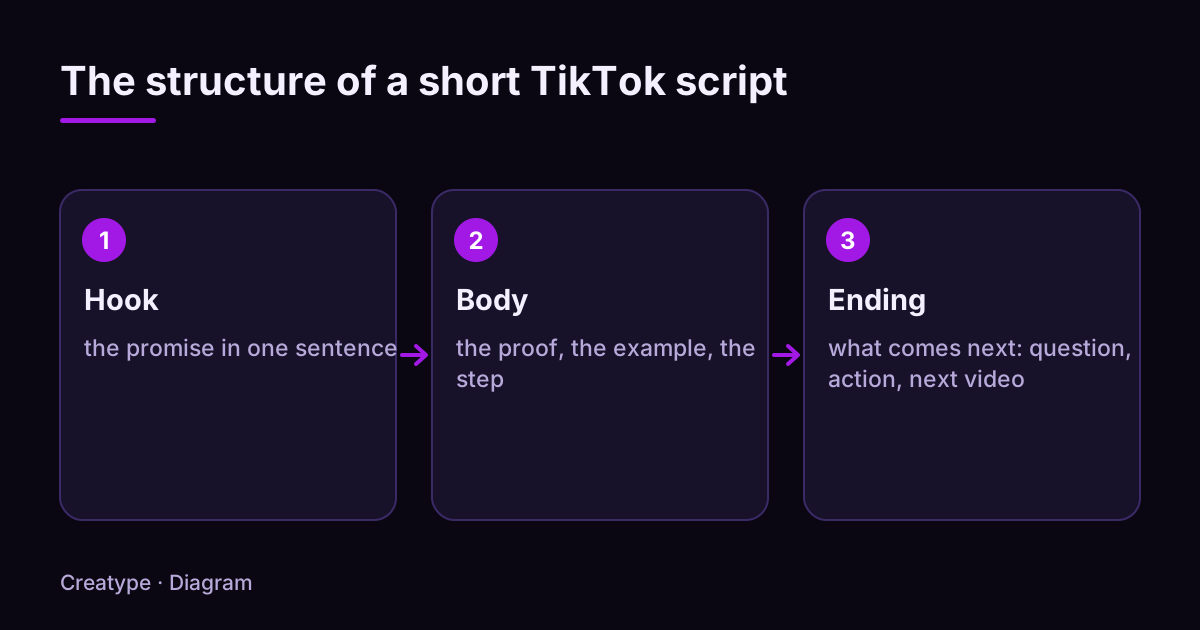
A TikTok script has three blocks. The hook opens the video and gives a reason to keep watching. The body delivers what the hook promised. The ending wraps up and offers one next step: comment, watch another video, try something.
The diagram below shows the three blocks and what each one is for. It is the frame you will give your assistant, and the grid you will use to proofread its answer: every sentence should belong to one of these blocks. If it belongs to none, delete it.
- Hook: one short sentence that says what the video is about or why it is worth watching. It answers the question “why should I stay?”.
- Body: two to four steps, one idea per step, each with a concrete example. It answers the question “what do I learn or see?”.
- Ending: one sentence that wraps up, then a single action. It answers the question “what now?”.
How long should a TikTok script be?
There is no required length. For a first video, keep it short: 20 to 30 seconds, one idea. A short script is easy to proofread, fix and film in a single take, so you do not get stuck on editing. The timings below are working guidelines, not TikTok rules: adjust them to your topic and to the way you speak.
To estimate the length of a text, count roughly two to three words per second at a calm pace. That is an order of magnitude: read your script aloud with a stopwatch to find your own pace, then use that number from now on.
- Video of about 20 seconds: hook 2 s, body 14 s, ending 4 s. That is 40 to 60 words in total. One idea, one or two steps.
- Video of about 30 seconds: hook 3 s, body 21 s, ending 6 s. That is 60 to 90 words. Two or three steps.
- Video of about 45 seconds: hook 3 s, body 34 s, ending 8 s. That is 90 to 135 words. Three steps with one example each.
- Video of about 60 seconds: hook 4 s, body 46 s, ending 10 s. That is 120 to 180 words. Keep this length for a topic that needs it, such as a story or a demonstration.
How do you write the hook of a TikTok script?
The hook may be the first thing you write or the last, but you always finalize it at the end: it must announce exactly what the video delivers. In an article where TikTok collects tips from creators, one of them recommends opening with a teaser or a strong highlight from the video and avoiding a rambling introduction.
For a first video, pick a topic you are comfortable showing to the people close to you: a tool you use, a method you tested, a mistake you fixed. Then ask yourself four questions in this order.
- Who am I talking to? Name the person or the situation (“If you use an AI assistant every day…”).
- What is the promise? A result, an answer or a story that the video will deliver.
- Which form? A question, a scene, an unexpected statement, or a result shown first.
- How will it appear? Spoken aloud, written on screen, or both. The text on screen and your voice should say the same thing.
Rather not do it by hand? Paste a TikTok link and get the audience profiles.
Analyse for freeHow do you get your AI assistant to write the body and the ending?
An AI assistant writes a good first draft if you give it the frame, not only the topic. Copy the brief below, replace the part in brackets with your topic, and ask for three versions of the hook so you can choose.
After that, you decide. Read the text aloud. Delete any sentence you would not say that way. After each sentence, ask yourself “so what?”: if the answer adds nothing, delete it. Replace every vague example with a detail only you can give: that is what makes the script yours.
Plan a change of image or shot for each step: it gives the video a rhythm and forces you to write what we see as well as what we hear. Add captions too: one of the creators quoted in TikTok’s tips calls them essential for accessibility, a clear message and viewer attention.
The ending has one closing sentence and one action. Three simple endings work for most topics.
- The brief to copy: “Write a 30-second TikTok script in English about [your topic]. Structure: a hook of fewer than twelve words, three short steps with one concrete example each, then an ending with a single question. Write the way people talk, with short sentences. For each step, say what we see on screen. Give me three versions of the hook.”
- Sum up: “In short: [idea] in [number] steps.” Useful for a tutorial.
- Ask a precise question: “And you, what do you do at step 2?” A precise question invites a precise answer in the comments.
- Point to what comes next: “Part 2 is on my profile.” Use it only if part 2 exists.
Three complete TikTok scripts to adapt
Here are three complete scripts, as your assistant might return them after you have proofread. The situations and timings are invented examples that illustrate the structure: replace them with your own topic. Each line gives the moment, what you say (voice) and what we see (screen).
To adapt a template, keep the timings and the logic, and change three things: the topic, the example and the final question. If a template feels too long, remove a step rather than speeding up your voice.
- Template 1, the three-step tip (example: someone explaining how to ask an AI assistant better, about 30 seconds). Example, 0–3 s. Voice: “Three mistakes that make your AI assistant’s answer unusable.” Screen: you facing the camera, the title as text.
- Template 1, 3–10 s. Voice: “One: a request that is too vague. Give the length, the audience and the tone.” Screen: a vague request crossed out, then the precise one.
- Template 1, 10–17 s. Voice: “Two: no example. Give it one sentence of what you want to hear.” Screen: the conversation on screen, the example sentence highlighted.
- Template 1, 17–24 s. Voice: “Three: keeping everything. Read it aloud and cut what you would not say.” Screen: a text with some words crossed out.
- Template 1, 24–30 s. Voice: “Which one were you doing? Tell me in the comments.” Screen: you facing the camera, the question as text.
- Template 2, the first-hand test (example: a one-week trial, about 25 seconds). Example, 0–2 s. Voice: “I let my AI assistant write my video. Here is what I kept.” Screen: its draft on screen.
- Template 2, 2–9 s. Voice: “Its hook was good, but the rest sounded like an article.” Screen: the text, the overly long sentences highlighted.
- Template 2, 9–18 s. Voice: “I cut two sentences, changed an example, and added something only I know.” Screen: the text before, then after.
- Template 2, 18–25 s. Voice: “In the end, a script I can say without stumbling. And you, what would you have kept?” Screen: you facing the camera, question as text.
- Template 3, the myth debunked (example: an opinion on a common belief, about 35 seconds). Example, 0–3 s. Voice: “‘AI does everything, you just press go.’ Not quite.” Screen: the words “does everything” crossed out in text.
- Template 3, 3–12 s. Voice: “It writes a first draft. But it does not know what your audience wants to hear.” Screen: a first draft, a question mark next to it.
- Template 3, 12–24 s. Voice: “What I do: I read the comments under videos on my topic, I reuse their words, then I ask for the script.” Screen: comments scrolling, a few words circled.
- Template 3, 24–35 s. Voice: “You steer, it drafts. And you, what do you start from when you write? Answer in the comments.” Screen: you facing the camera.
What checklist should you use before launching your first TikTok script?
Read the script aloud with a stopwatch before you film. Tick every item: a script that passes this list is ready to shoot. You do not need editing software for the first video: a single take facing the camera is enough to start, and captions can be planned in the script.
- The first sentence fits in one breath and states the topic or the promise.
- The spoken hook and the hook written on screen say the same thing.
- The video covers a single idea.
- The body has four steps at most, each backed by an example.
- Every sentence has a job: if you remove it, the video loses something.
- No word you would not say out loud: the assistant’s text has been rewritten your way.
- Each step matches a specific image or shot.
- The ending proposes a single action, in one sentence.
- The time you measured while reading aloud matches the target length, give or take a few seconds.
- Captions are planned.
- You can sum up the video in one sentence without looking at the script.
- A stranger who has never heard of your topic understands every sentence.
What mistakes delay a first TikTok video?
- Waiting to know how much it pays before you publish: nobody can say in advance, and the first video is the only way to get a real answer.
- Looking for the perfect script instead of a script you can film: one short video published beats ten ideas waiting.
- Keeping the assistant’s text as it is, without saying it aloud.
- Asking for a script with no frame and no precise topic: the answer is vague, and you spend more time fixing it.
- Starting with an introduction (“Hi, I’m…”) before saying what the video is about.
- Promising something in the hook that the body does not deliver.
- Putting two or three topics into one video.
- Picking a first topic you would be embarrassed to show the people close to you, when a neutral one (a tool, a method, a test) lets you start without that pressure.
- Writing without having looked at what the audience for your topic asks or comments.
How does Creatype help you write a TikTok script?
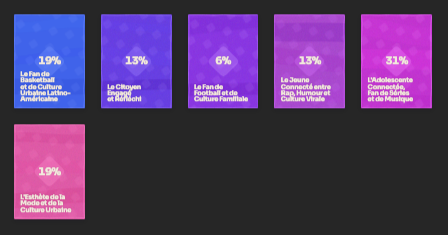
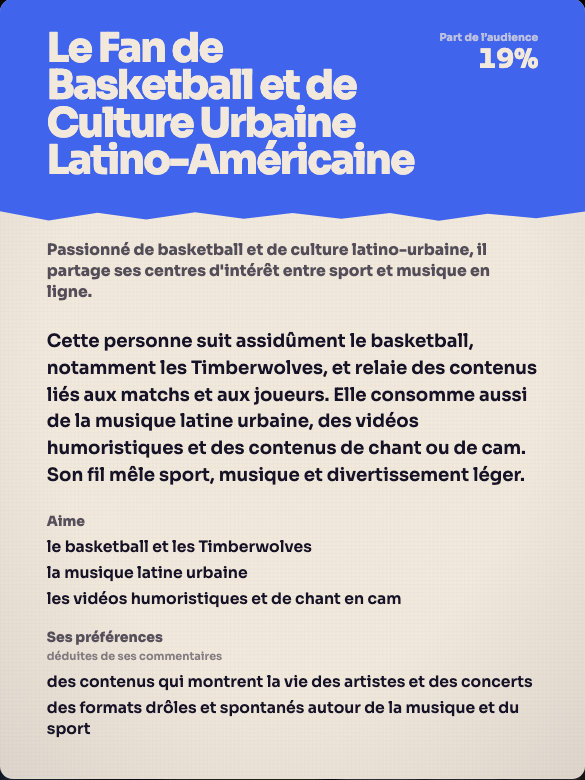
The method above works without any tool, with your assistant alone. Creatype helps with one specific step: knowing who you are talking to before you write, so the script starts from a real audience and not from a guess. You create a free account (with Google or a link sent by email, no credit card), then paste the link to a TikTok video or account. Creatype reads the video’s context, the public comments and the profiles that react, then returns them as audience profiles.
These profiles help you choose the topic, the promise of the hook and the words of the script. The Prisme assistant can then help you write ideas and scripts based on what you learned. If you prefer to stay in your own assistant (Claude, ChatGPT, Cursor or Codex), Creatype’s MCP lets it create ideas and scripts in your account, under the same rules as the app; it is reserved for paid plans.
Before you launch an analysis, you set the number of profiles, the depth (Light, Standard or In-depth) and the model. A quote is shown before launch, and you can cancel. The Free plan includes the Haiku model, up to 5 audience profiles and 100 accounts examined; the In-depth level is not included. The Go plan (€13 a month, or €120 a year) gives access to all models, the In-depth level, PDF/CSV export and Planifier for 1 followed account. The Pro plan (€105 a month) lets you schedule 5 accounts.
For your first script: create the free account, paste the link to a video on your topic, look at who reacts to it, then write for those people.
See it on a real video: create a free account and analyse a TikTok link.
Analyse for freeSources and further reading
The writing advice in this guide is a working method. What TikTok says about opening a video and about captions comes from the article below, which collects tips from creators. To measure the effect of a script, TikTok describes in a tutorial the statistics available for each video, including average watch time, and recommends looking at trends over time rather than at a single metric.
Try it on your own video
The free plan needs no card: create your account, paste a TikTok link, get the audience profiles. Go (€13/month) adds every model, Deep analysis, PDF and CSV export and Schedule.
Was this article helpful?