
TikTok Video Ideas From Your Audience: What to Post When Your Videos Are Not Taking Off
For you if you have already posted TikTok videos that did not take off and want to know what to post next.
By Creatype · Updated November 7, 2026 · 10 min
In short
You have already posted, views stay low, and 1,000 followers feel far away. The useful question is not “what am I doing wrong?” but “who do I want to reach, and what are they waiting for?”. A first hypothesis to test: your videos do not answer a specific request that people are already making. A hypothesis, not a verdict: no method guarantees views, and this guide promises none.
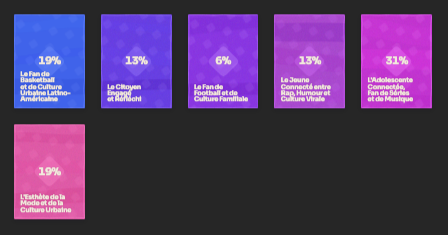
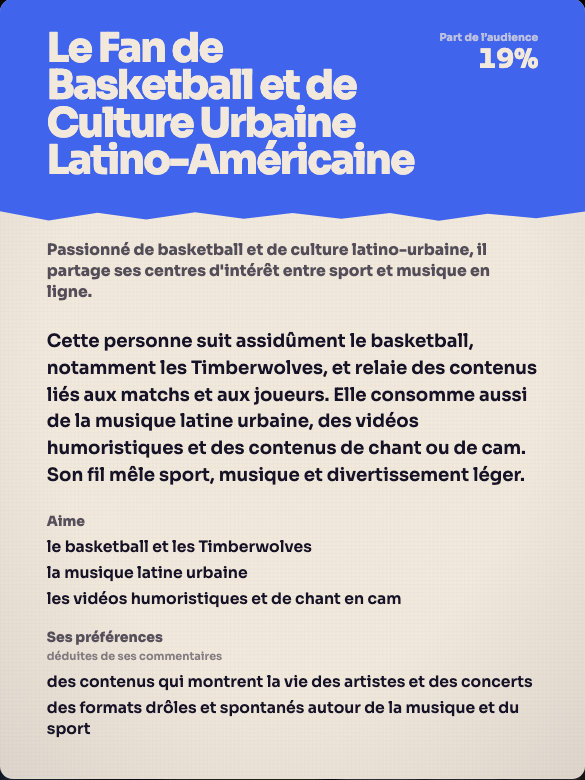
Why are my TikTok videos not taking off, and how do I find what to post?
The direct answer: start from what your audience asks for, ideally as an audience map (who reacts, and what each group expects). Turn each request into a precise promise, rank with five criteria, then film the best ones. You keep the decisions: the topic, the angle, what goes out. The reading, the formatting and the first draft of the scripts can be handed to your AI agent.
This guide follows that order: the four-step method, where to find the requests, how to turn them into ideas, 15 written examples, a ranking grid, what TikTok says about recommendations, then how Creatype produces the audience map and what you can do with it alongside your agent. You can also apply the whole method by hand, with a spreadsheet or a sheet of paper.
What is the method, from an audience request to an idea?
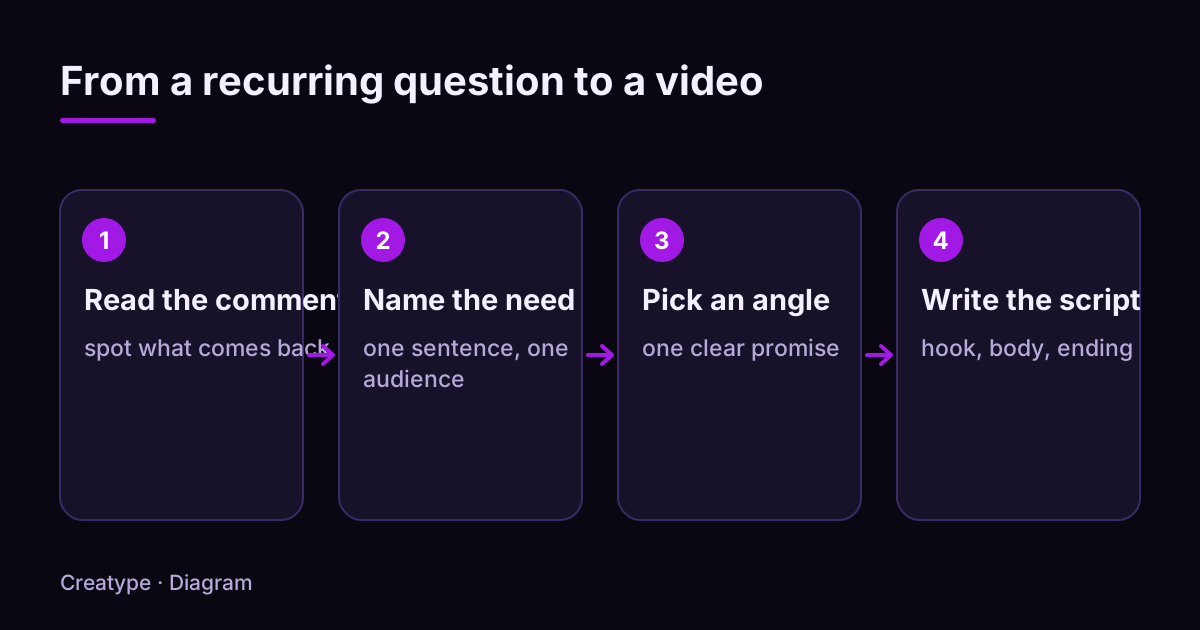
The method has four steps. It starts from what people write, not from what you imagine they want. That is what separates an idea that answers someone from one that only interests its author.
Each step produces a short written note. If you cannot write the need from step 2 in one sentence, the request is not clear enough yet: keep reading before you move on to the angle. You do not need to know content creation to apply these steps: spotting what repeats is enough.
- Step 1, read. Gather 30 to 50 recent comments or messages, or open the audience map (see section 8), and mark what comes back: a question, an objection, a word, a comparison.
- Step 2, name the need. Write in one sentence what the person wants to get and who they are. Example: “beginners who want to run 5 km without getting hurt”.
- Step 3, choose an angle. An angle is a precise promise: an answer, a demonstration, a mistake to avoid, a comparison. It fits in one sentence a viewer understands in three seconds.
- Step 4, write the script. A hook that repeats the question, a body that answers it, an ending that says what to do next.
Where do you find what your audience asks for?
Requests hide in several places. Start with the fastest source, then widen the search.
- The audience map of your account or of a video: it groups the people who react into profiles, with what each group asks for. It is the quickest read when comments are numerous.
- The comments on your own videos, especially those with a question mark or the word “how”.
- Direct messages and the questions friends, customers or colleagues ask you out loud. Write them down as soon as you hear them.
- The public comments on videos from accounts close to your topic. Read the ones that got many replies: they are often questions a lot of people share.
- The comments under your most watched videos and under the ones that did not do well. Read both: one shows what hooked people, the other what was missing.
How do you turn a request into a video idea?
A request is not an idea yet. To turn it into one, fill in this formula: “For [a specific person] who [has a problem], here is [a visible result], shown as [a format].”
Example: the question you see in the comments is “I don’t know which AI tool to pick for my project”. The need: beginners hesitating between two tools. The idea: “For anyone torn between two AI tools, here is the same exercise done in both, shown in a split screen.”
To pick the format, ask one question: what proves the answer fastest? If the answer is a demonstration, film it. If it is a list, show it on screen. If it is a common mistake, show the mistake first, then the fix. If it is an opinion, say it in the first sentence.
If the thought of people close to you watching your videos holds you back, pick formats where you do not appear: screen capture, voice-over, on-screen text. The question “what proves the answer fastest?” often has a better answer there than a shot of you facing the camera.
Keep your audience’s own words too. If ten people write “struggling” and nobody writes “difficulty”, use “struggling” in the hook. Exact words make people recognise the question faster than correct but more distant ones.
Rather not do it by hand? Paste a TikTok link and get the audience profiles.
Analyse for freeExamples: 15 TikTok video ideas born from audience requests
The 15 ideas below are invented examples that show how to go from a request to an idea. They come from no real analysis and promise no result. Replace the question with the ones your own audience asks.
- Example 1, AI tools. Question: “Which AI tool should I use to summarise a lecture?”. Idea: “The same lecture summarised by two AI tools, side by side, with what each one leaves out.”
- Example 2, AI tools. Question: “Texts written by an AI are spotted immediately”. Idea: “A raw AI text versus the same text reworked with three instructions, read out loud.”
- Example 3, AI agent. Question: “I don’t know which task to start with using an AI agent”. Idea: “The three repetitive tasks I handed to my agent this week, result on screen.”
- Example 4, a project with an AI. Question: “I’d like to build a small app with an AI, where do I start?”. Idea: “A mini-app built live from one sentence, from the first message to the result.”
- Example 5, organisation. Question: “How do I organise my week between work and a side project?”. Idea: “My weekly planner, box by box, between work and a personal project.”
- Example 6, organisation. Question: “I procrastinate as soon as I sit down to my project”. Idea: “The ten-minute rule, tried in front of you on a task I have put off for days.”
- Example 7, studying. Question: “I reread my notes but retain nothing”. Idea: “The revision method that replaces rereading, tried in front of you on a real lesson.”
- Example 8, studying. Question: “How do I get organised before exams?”. Idea: “My four-week revision schedule, box by box.”
- Example 9, fitness. Question: “Where do I start if I have never run?”. Idea: “My first week of running, day by day, without skipping anything.”
- Example 10, fitness. Question: “My knees hurt after every session”. Idea: “The warm-up mistake many beginners make, and the corrected version.”
- Example 11, cooking. Question: “I have no time to cook on weekdays”. Idea: “A full dinner in 15 minutes, with the timer on screen.”
- Example 12, cooking. Question: “How do I prepare the week without spending all of Sunday on it?”. Idea: “Four meals prepared in one hour, with the timer on screen.”
- Example 13, personal finance. Question: “How do I save money on a small salary?”. Idea: “My one-page budget sheet, filled in live with sample numbers.”
- Example 14, a side project. Question: “How do I know whether my idea interests anyone?”. Idea: “I test an idea with a single video, and read the replies together.”
- Example 15, content creation. Question: “I don’t know what to say in the first three seconds”. Idea: “Three sentence openers to copy for starting a video, with one example each.”
How do you rank your ideas before you film?
You will have more ideas than time. To choose, score each idea from 0 to 2 on the five criteria below, then add them up. It is not a scientific formula: it is a way to compare your ideas with the same eyes.
Once the points are added up (see the list below), a total of 8 to 10 deserves to be filmed first. Between 5 and 7, reword the angle or wait for a second occurrence of the question. Below 5, set it aside: keep it in a list, it may get better later.
After you publish, write next to each idea what happened: reactions, new questions, visible drop-offs. The comments on one video give you the questions for the next one. You build a loop: request, idea, video, new requests. It is that loop, repeated over several videos, that teaches you something, not a single video.
- Recurrence: the question appeared several times (2), once (1), never (0).
- Precision: you can say who the video is for in one sentence (2), roughly (1), not at all (0).
- Visible proof: the answer can be shown on screen (2), partly (1), can only be said (0).
- Ease: you can film it this week with what you have (2), with some preparation (1), something is missing (0).
- Freshness: you have not published the same thing (2), a similar idea (1), the same one (0).
What does TikTok say about how videos are recommended?
TikTok explains on its newsroom that recommendations in the For You feed rely on signals such as the person’s interactions (videos liked or shared, accounts followed, comments posted, content created) and the video’s information (captions, sounds, hashtags). TikTok also says that follower count and previous high-performing videos are not direct factors, and that each person’s feed is different.
What this changes for your ideas: a caption that reuses the words of the question helps describe the video, and a precise idea speaks to specific people rather than to “everyone”. It does not mean a good idea will be recommended: TikTok does not publish the exact weight of each signal.
How does Creatype produce the audience map, and what do you do with your AI agent?
Reading 50 comments by hand is doable. Reading several hundred, along with the accounts that wrote them, takes much longer. Creatype does that reading and hands you the result.
You create a free account with Google or with a link sent by email, no credit card, then paste the link of a TikTok video or account: yours, or a creator’s in your topic. Creatype reads the video’s context, the public comments and the profiles that react, then returns audience profiles, called Créatypes: groups of people who react in the same way, with what they ask for. That is your audience map. It describes the public profiles that react, not every viewer. You start from those profiles to apply steps 2 to 4 of the method, and you can ask the Prisme assistant for ideas and scripts.
If you already work with an AI agent, you can connect it to Creatype through the MCP connector: it then reaches the Créer and Analyser spaces of your account. The connection is set up in Settings → MCP, under Account, and depends on your client; the guide “Connect Creatype to Claude, ChatGPT, Cursor or Codex” has the detail. The principle stays the same: the agent reads, you decide. An effective brief fits in four lines:
- Context: the audience map and the formula from section 4.
- Request: ten ideas, each with the original question, the promise in one sentence and the format.
- Ranking: a score from 0 to 2 on the five criteria from section 6. You then choose yourself.
- Script: only for the three best, with hook, body and ending.
See it on a real video: create a free account and analyse a TikTok link.
Analyse for freeSources and further reading
The statements about how TikTok recommendations work come from the official page below, opened while writing this guide. The example ideas are invented.
Try it on your own video
The free plan needs no card: create your account, paste a TikTok link, get the audience profiles. Go (€13/month) adds every model, Deep analysis, PDF and CSV export and Schedule.
Was this article helpful?