
How to see who watches my TikTok videos, and what to tell brands
For you if you would like to work with brands someday and first want to know exactly who is watching your videos.
By Creatype · Updated November 7, 2026 · 10 min
In short
You would like to know who watches your videos, maybe so that one day you can write to a brand with something better than “I have a community”. TikTok does not give you the list of everyone who watches your videos. It shows statistics about your viewers in TikTok Studio (key metrics, demographics, activity times), and two optional view histories that name some accounts, under strict conditions. To know the people themselves, you have to add what they write: public comments.
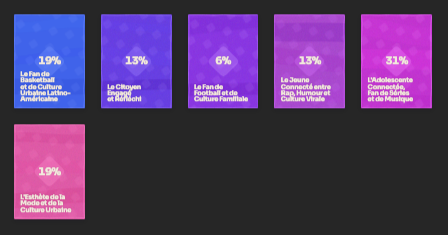
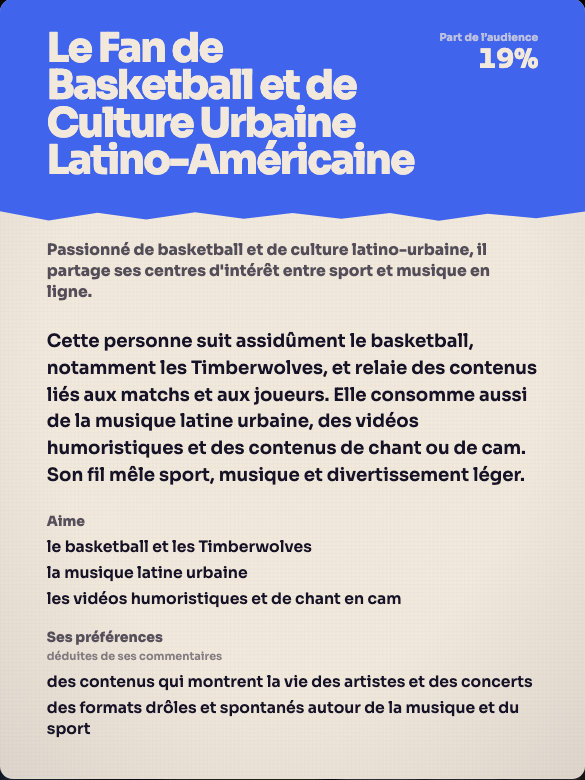
How can you see who watches your TikTok videos?
This guide says precisely what each TikTok tool shows and does not show, then how to read your comments to describe your audience with facts. It promises no partnership and no income: no tool can decide for you that a brand will answer. What you can control is knowing who you are talking to and being able to say it in a few sentences.
The plan: TikTok’s three sources, how to open them, their limits, the comment method, how to present your audience to a brand, then automation. Nothing complicated: you do not need to open everything, only to know what to look for and where.
What does TikTok show about the people who watch your videos?
According to the official help pages, TikTok offers three different things. They do not answer the same question. The two view histories are optional and have conditions on age and follower count. Studio statistics are described as a free tool, but TikTok says the option is not available to everyone.
- TikTok Studio statistics: numbers about your views and your audience. The help describes a Viewers tab with “key metrics, demographics, and activity times”, and a Followers tab for the people who follow you.
- Profile view history: a list of accounts that visited your profile, under conditions.
- Post view history: a list of accounts that viewed or reacted to your recent posts, under conditions.
How do you see your viewer statistics in TikTok Studio?
In the TikTok app, tap Profile, then the Menu button, then TikTok Studio. In the Posts tab, tap Analytics. On a computer, TikTok Studio opens at www.tiktok.com/tiktokstudio. The help describes Analytics as a free tool.
The help separates account statistics from video statistics.
- Account: Overview (summary), Content (metrics for all your posts and trending content), Viewers (key metrics, demographics and activity times of your viewers), Followers (demographic view and other insights on your followers).
- Video: Overview (summary of the post), Viewers (the same kinds of information for that video), Engagement (comment insights, ideas for future posts).
- For one specific video: on your profile, open the post, then tap “More insights” or “More data” at the bottom.
- Three questions to ask when you open the Viewers tab: at what hours are my viewers active? which audience is most represented? is this the audience I am aiming for? Write the answers down with the date. They help you choose a posting time and a language, and describe your audience (section 8), not name people.
How do you see who visited your profile?
TikTok calls this feature “Profile view history”. According to the help, you see the accounts that visited your profile, but only those that also turned the setting on, and only over the last 30 days. The rule works both ways: if you visit a profile whose owner turned the setting on, they see your visit.
Conditions: you must be at least 16 and have fewer than 5,000 followers. The setting is off by default.
- In the app: Profile, Menu, Settings and privacy, Privacy, Profile views, then turn on “Profile view history”.
- Shortcut: on your profile, tap the Profile views button at the top, then the settings button. You can also go through Inbox, Activities, then the profile-visit notification.
- If you turn it off, you no longer see who visited your profile, and others no longer see your visits.
- Before you turn it on, remember the trade-off: your own visits become visible to accounts that turned the setting on. If you prefer to browse profiles discreetly, leave it off.
- What the list tells you: which accounts are interested in you, and whether they are creators, possible customers or people you know. It does not say which videos they watched.
- If the idea of seeing people you know drop by makes you uncomfortable, leave this setting off, as it is by default. You do not need it for the rest of this guide: Studio statistics and comments are enough to describe your audience.
Rather not do it by hand? Paste a TikTok link and get the audience profiles.
Analyse for freeHow do you see who viewed one of your posts?
The feature is called “Post view history”. According to the help, it shows three kinds of people, and only for posts from the last 7 days.
- People who follow you, turned the setting on and viewed the post.
- People who do not follow you but liked or commented on the post, whether or not their setting is on.
- Conditions: you must be at least 16 and have fewer than 5,000 followers.
- To turn it on: Profile, Menu, Settings and privacy, Privacy, Post views, then “Post view history”.
- Even if you turn this setting off, your comments and likes on other people’s posts still show up as views for them, according to the help.
- What the list tells you: which of your followers are engaged, and which people outside your followers took the trouble to like or comment. It does not tell you how many other people simply watched; for that number, use the statistics in Studio.
- Story view history is separate from post view history and is not changed by this setting.
What TikTok does not show
Reading the rules above, several limits follow. They are direct consequences of what the help says, not opinions.
A person who does not follow you and watches without liking or commenting does not appear in a post’s view history. A person who turned the setting off does not appear in the profile history. A post older than 7 days is no longer covered by the view history. And if you have 5,000 followers or more, neither history is available to you.
Studio statistics, for their part, are described with metrics, demographics and activity times. The pages reviewed for this guide do not describe a list of names in those tabs.
In practice: for a video older than 7 days, for an account with 5,000 followers or more, or for someone who watches without interacting and without following you, these histories give you no name. You have the numbers in the Viewers tab, and the public comments. To describe your audience to a brand, you will rely on those two sources, not on a list of names.
Why do public comments complete the statistics?
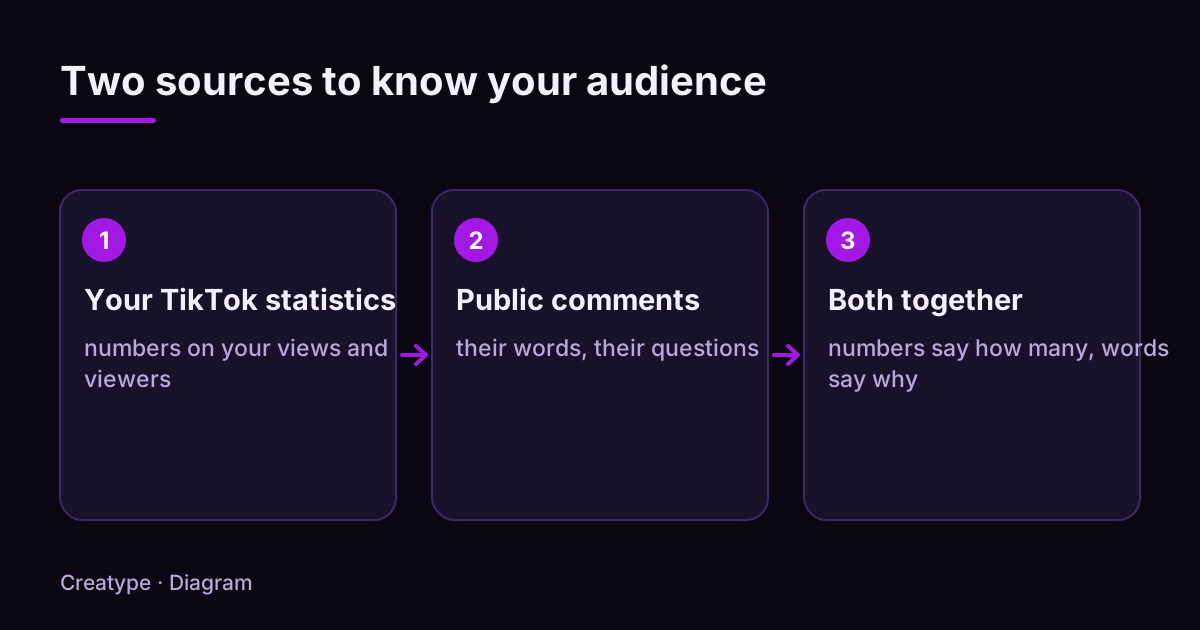
Statistics answer “how many” and “when”. They do not answer “who are these people and what do they want?”. Public comments answer part of it: they are written by people who react, in their own words, and each comment is linked to a public account you can open.
A limit to keep in mind: people who comment are a small part of those who watch. You learn what the people who react think. You do not learn what all viewers think.
Comments are public, but they belong to people. Use them to spot groups and expectations, never to contact or expose someone who asked for nothing. If a comment names a private detail about someone, leave it out of your notes. To choose which tool to open depending on your question, here is a simple rule.
- “How many people saw this video, and at what time?”: open TikTok Studio, Overview and Viewers tabs.
- “What age and region are my viewers?”: the Viewers and Followers tabs in Studio, when available for your account.
- “Which accounts visited my profile?”: Profile view history, if you meet the conditions.
- “What do people want, doubt, ask?”: the comments, public, which you read yourself or which Créatype summarizes.
- “Does my audience match my goal?”: cross both, Studio numbers on one side, comment groups on the other.
How do you read your comments, then present your audience to a brand?
Take one video and open its comments. For each comment, note what the person asks and, when their public profile shows it, their field or situation (student, parent, someone starting a journal, stationery lover). Record only what is publicly displayed and never try to identify a person: the aim is to describe groups.
An invented example: under an evening-routine video you copy 30 comments. Ten people ask which notebook you use, eight say they struggle to keep a routine going, five are preparing exams. The picture that comes out: people who are starting out, often short on time because of their studies, looking for a gentle routine they can keep. You now know who to talk to in the next video and with which words.
This record then serves one precise purpose: writing, whenever you choose to, a few true sentences about your audience that you can attach to a message to a brand. This guide does not say what a brand will decide, and nobody can promise it. It gives you what you need to describe your audience without inventing anything.
- Group the comments that look alike. Three to five groups are enough.
- Give each group a short name (“busy beginners”, “stationery lovers”).
- Write down, for each group, what it asks and what holds it back.
- Repeat the exercise on three videos. A group that shows up everywhere is your core audience.
- Keep each analysis dated. Your audience changes when your topics change, so a table from six months ago describes the people of that time.
- Sheet to copy for each group: group name / what these people say (two quotes) / what they ask / what holds them back / my next video for them.
- Final check: compare your groups with the Viewers tab numbers. If the numbers show an older audience and your comments come from younger people, you may be talking to a smaller group than your real audience.
- Audience presentation to copy: who watches you (your groups, with their short names) / what they ask (two quotes without account names) / what the Viewers numbers say (language, age and region when the tab shows them, activity times) / the date of the record.
- Write what you observed, with the date, and nothing else. Do not round up, do not invent any number, do not promise the brand any result: an accurate description is worth more than a flattering one.
- Quote a comment only if it contains no private detail, and without the account name. Never contact the people you are describing.
How do you get these profiles without reading everything by hand?
Créatype automates this reading. You create a free account, with Google or with a link sent by email, no credit card, then you paste the link of a TikTok video or account. Créatype reads the video’s context, the public comments and the profiles that react, then returns audience profiles called Créatypes. In each profile you find the same elements as in your hand-made sheet: a name, what these people like, what they ask.
You set the number of profiles, the depth (Light, Standard, Deep) and the model. A quote is shown before launch and you can cancel. The Free plan includes the Haiku model, up to 5 audience profiles, 100 accounts examined, without the Deep depth. The Go plan (€13 per month, €120 per year) gives all models, Deep, PDF and CSV export, and Planifier for one followed account. The Pro plan (€105 per month) follows five accounts with Planifier.
Créatype does not give the list of a video’s viewers: it works on what is public, meaning the comments and the profiles that react. It guarantees no partnership: it helps you know who is talking to you. Start with the Free plan on one of your videos, compare the result with your sheet, and keep what seems right to you.
See it on a real video: create a free account and analyse a TikTok link.
Analyse for freeSources and further reading
The TikTok help pages below were opened and read on November 6, 2026. Features can vary by country and account.
Try it on your own video
The free plan needs no card: create your account, paste a TikTok link, get the audience profiles. Go (€13/month) adds every model, Deep analysis, PDF and CSV export and Schedule.
Was this article helpful?