
Start on TikTok without your friends seeing it: the settings to know before you post
For you if you want to try TikTok but worry that friends or people around you will see your videos and make fun of them.
By Creatype · Updated November 7, 2026 · 7 min
In short
You can try without exposing yourself: set the account to private, turn off suggestions of your account to your contacts, choose who can comment, then keep your first videos as drafts or post them as “Only you”. One limit to know: your nickname, username and profile photo stay visible to everyone, and your account can still be found through search.
How do you start on TikTok without your friends seeing it?
This guide answers two questions that go together: “does this actually work?” and “what happens if my friends come across it?”. For the first, nobody can give you a guarantee, and this guide gives none. For the second, TikTok publishes precise settings, which we repeat here with their official page, read on 7 November 2026.
- What each person sees on a private account and on a public account
- The settings that depend on your age
- How to open a discreet account, step by step
- What your friends can still see
- What you can prepare without posting anything
- How to stay in control once you post
- What this guide cannot promise
Who sees what: private account or public account?
On TikTok, you choose between a private account and a public account. With a private account, you approve the people who can follow you, watch your videos, LIVE videos, bio and likes, and see your followers and following lists. With a public account, these can be seen by anyone, on or off TikTok, whether or not they have an account, and your content may appear in search engines, blogs, social media posts and news sites.
In both cases, TikTok states that your name, username and profile photo are always visible to anyone, and that other people can search for your account. You can also restrict each post separately. And you choose who can comment, who can send you messages and whether your account is suggested to others.
How old do you need to be, and what does your age change?
TikTok accounts are available to people at least 13 years old, or another age indicated in TikTok’s Privacy Policy and Terms of Service. To protect you, TikTok applies default settings by age, and some features are not available until you turn 16 or 18. You can change what can be changed at any time, including at sign-up (depending on your age and local law).
According to TikTok’s page on privacy and safety settings for people under 18, here is what is set by default:
- Account: from 13 to 17, the account is private by default when you sign up. You can change it at any time.
- Suggesting your account: from 13 to 17, the “Suggest your account to others” settings are turned off. They are turned on by default from 18.
- Comments: from 13 to 15, only followers you follow back (“Friends”) can comment, and this cannot be changed. At 16 or 17, it depends on the account type: followers for a private account, everyone for a public account, with the option to switch to “Friends”.
- Direct messages: from 13 to 15, messaging is not available. At 16 and 17, restrictions apply depending on whether the account is private or public.
- Downloads: from 13 to 15, downloads of your videos by others are turned off and cannot be changed.
How do you open a discreet TikTok account, step by step?
You can sign up with an email address, a phone number or a social media account. An email or phone number can only be linked to one TikTok account. Then choose your username carefully, and set the following before you post anything.
- Private account: in the app, tap Profile at the bottom, then the Menu button at the top, then Settings and privacy, then Privacy, and turn the Private account setting on.
- Suggesting your account: still in Privacy, open the setting that suggests your account to others and turn off Contacts, Facebook friends and People who open or send links to you.
- Syncing: do not sync your contacts or your Facebook friends. If you already did, the same screen lets you remove previously synced contacts.
- Comments: in Privacy, then Comments, open Allow comments from and choose Friends, or Followers if the account is private. On each video, the Allow comments option can also be turned off.
- Messages: in Privacy, then Direct messages, choose Don’t receive for people you do not know, if the option is offered to you.
- Check the rest: profile view history and activity status are turned off by default, and activity status only exists from age 18.
The exact labels can vary a little depending on the app version and language. When in doubt, TikTok details each path in the pages cited at the end of this guide.
Rather not do it by hand? Paste a TikTok link and get the audience profiles.
Analyse for freeWhat can your friends still see despite these settings?
A setting reduces what is visible, it does not make the account impossible to find. Here is what TikTok writes, and the points that surprise people most.
- Suggestions: even if all suggestion settings are off, your account may still be suggested to people you follow, interact with or share mutual connections with on TikTok. If you are 13 to 17, it is not suggested to mutual connections.
- Links: if you keep the “People who open or send links to you” setting on, your account may be suggested to someone to whom you sent a TikTok video link, including by text message or another app.
- Private account: only people you approve can follow you and see your posts. Even with suggestions on, a private account is suggested but nobody can follow it without your approval.
- Profile views: profile view history is off by default. You only see visits from accounts that turned it on, and they see yours only if you turned it on too. The feature is limited to accounts aged 16 or over with fewer than 5,000 followers.
- Activity status: off by default. Mutual followers only see when you are active if you both turned the setting on, and it only exists from age 18.
- Blocking: blocking someone stops you both from seeing each other’s posts, finding each other in search and messaging each other. The person is not notified. TikTok notes a few exceptions: you may still meet them in a multi-host LIVE, in a Duet posted by another account or in a shared group chat.
What can you prepare without posting anything?
You can film, edit and think without showing anything to anyone. Here is what TikTok provides.
- Drafts: at the end of creation, instead of tapping Post, tap Drafts to save. Drafts are visible only to you on your profile.
- Visibility of each post: for a video, you can choose Everyone, Friends (followers you follow back) or Only you. On a private account, the choice is Followers, Friends or Only you. Depending on your age and location, visibility can even be set to Only you by default and cannot be changed until you reach a certain age.
- Changing it afterwards: you can change the visibility of a post that is already online, from the post’s options, then Privacy settings. The view count shown stays the total of all views to date.
- A trap to know: a new post keeps the privacy setting of the previous one. If you chose Only you for the last one, the next one will be Only you too. Always check the screen before you post.
- Look before you post: you can also study a public video from another account with Creatype, without posting anything yourself (see below).
How do you stay in control once you post?
When you move from “trying in private” to “showing a few people”, go in steps: first Only you, then Friends, then a public account only if you decide to. At each step, here are the official tools:
- Choose who comments: Everyone (public accounts), Followers (private accounts) or Friends. You can also turn comments off video by video.
- Filter comments: TikTok can hide spam comments, comments containing words you choose, and inappropriate or offensive ones. Hidden comments are yours to approve or delete.
- Block: from the person’s profile, or by blocking several accounts at once from a video’s comments.
- Go back: you can switch a public account back to private at any time in Privacy.
Does it actually work? What nobody can promise
Ask the question straight: nobody, not TikTok, not an influencer, not Creatype, can tell you how many views, followers or how much success you will get. What TikTok publishes is rules and settings, not results. This guide therefore contains no promise, and anyone who makes you one should give you a source you can open.
What is verifiable, on the other hand, is the cost of trying. With a private account, drafts and Only you posts, trying costs no exposure. You learn the platform, you film, you see what happens, and you decide afterwards whether to continue. It is the safest way to answer “does it work for me?” yourself.
How can Creatype help, without pressure?
Creatype helps you understand who reacts to a TikTok video. You paste the link of a public video, from any creator, and Creatype reads the public comments and the profiles that react, then returns them as audience profiles: which questions come back, in which words. This can help you choose a topic before you film, and later understand who reacts to your own videos, once they are public.
The Free plan lets you try without a credit card, and you can stay on it as long as you like. Creatype is not intended for people under 15, according to its privacy policy. It promises no views and no success: it helps you choose what to say. To analyse a public video, you just paste its link.
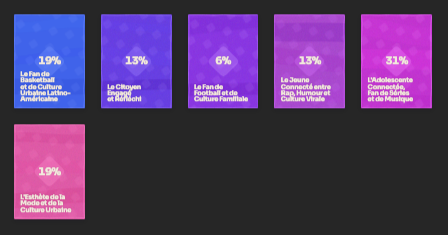
See it on a real video: create a free account and analyse a TikTok link.
Analyse for freeSources and further reading
Every setting and age rule in this guide comes from an official TikTok page opened and read on 7 November 2026. TikTok updates its settings: check in the app, which is authoritative.
- TikTok: choosing between a private or public account
- TikTok: privacy and safety settings for users under 18
- TikTok: suggested accounts
- TikTok: post privacy settings
- TikTok: manage comments
- TikTok: manage direct messages
- TikTok: profile view history
- TikTok: activity status
- TikTok: blocking someone
- TikTok: making a post and saving a draft
- TikTok: Creator Rewards Program, minimum age
- How much does TikTok pay? What the platform really pays
Try it on your own video
The free plan needs no card: create your account, paste a TikTok link, get the audience profiles. Go (€13/month) adds every model, Deep analysis, PDF and CSV export and Schedule.
Was this article helpful?